


个人比较喜欢白金里面毁坏世界的动态背景于是今天尝试了蛮久该怎么实现,做好后发现饭堂这边没人提过,遂分享之,我用的是ess21,能跑,效果也很好,
首先我们需要把需要的图片放进graphic目录下的parallax文件夹(没有的话就自己新建一个,我就这么新建的),这个是脚本的配置区,包含背景和云,配置区里的毁坏世界背景命名为distortion_base,png形式,云的话我扣出来放附录了,需要的话可以直接拿

然后就是脚本,把下面那段直接复制粘贴过去放在Spriteset Map的最底部就可以了!就像这样,如图。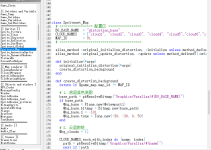
——————————————————
——————————————————
——————————————————
——————————————————
随附件五张云的图片
cloud1到cloud5,我已经剪好了可以直接用,希望可以帮到各位老大!
首先我们需要把需要的图片放进graphic目录下的parallax文件夹(没有的话就自己新建一个,我就这么新建的),这个是脚本的配置区,包含背景和云,配置区里的毁坏世界背景命名为distortion_base,png形式,云的话我扣出来放附录了,需要的话可以直接拿
然后就是脚本,把下面那段直接复制粘贴过去放在Spriteset Map的最底部就可以了!就像这样,如图。
——————————————————
——————————————————
代码:
class Spriteset_Map
  # ================= 配置区 =================
  BG_BASE_NAME  = "distortion_base"
  CLOUD_NAMES   = ["cloud1", "cloud2", "cloud3", "cloud4", "cloud5"]
  MAP_ID        = 91
  # ==========================================

  alias_method :original_initialize_distortion, :initialize unless method_defined?(:original_initialize_distortion)
  alias_method :original_update_distortion, :update unless method_defined?(:original_update_distortion)

  def initialize(*args)
    original_initialize_distortion(*args)
    create_distortion_background
  end

  def create_distortion_background
    return if $game_map.map_id != MAP_ID

    # 1. 底层蓝色底图
    base_path = pbResolveBitmap("Graphics/Parallax/#{BG_BASE_NAME}")
    if base_path
      @bg_base = Plane.new(@viewport1)
      @bg_base.bitmap = Bitmap.new(base_path)
      @bg_base.z = -101
      @bg_base.tone = Tone.new(-30, -30, 0, 50)
    end

    # 2. 云层数组
    @bg_clouds = []

    CLOUD_NAMES.each_with_index do |name, index|
      path = pbResolveBitmap("Graphics/Parallax/#{name}")
      next if !path

      cloud = Sprite.new(@viewport1)
      cloud.bitmap = Bitmap.new(path)

      # 稍微错开z值防止叠加闪烁
      cloud.z = -100 - index

      # 【核心修改】改为 240, 240
      cloud.ox = 240
      cloud.oy = 240

      # 随机初始角度,让它们错开
      cloud.angle = rand(360)

      # 自转速度
      rot_spd = (rand(10) - 5) / 20.0
      cloud.instance_variable_set(:@rot_speed, rot_spd)

      # 随机透明度防止糊成一团
      cloud.opacity = 80 + rand(100)
      cloud.tone = Tone.new(-30, -50, 20, 100)

      @bg_clouds << cloud
    end
  end

  def update
    original_update_distortion
    return if !@bg_clouds || @bg_clouds.empty? || !$game_player

    # 获取玩家屏幕坐标
    center_x = $game_player.screen_x
    center_y = $game_player.screen_y

    @bg_clouds.each do |cloud|
      next if cloud.disposed?

      # 使图片的 (240, 240) 像素点与玩家重合
      cloud.x = center_x
      cloud.y = center_y

      # 自转
      rot_spd = cloud.instance_variable_get(:@rot_speed)
      cloud.angle += rot_spd
    end
  end
end
——————————————————
随附件五张云的图片
cloud1到cloud5,我已经剪好了可以直接用,希望可以帮到各位老大!
附件





由版主最后编辑:


